 Skip to content

Start with your localization files
18 Strings brings your project’s localization strings into one Mac workspace. Keep your project under version control or make a copy before applying bulk changes so you can review the result.
Find unfinished work
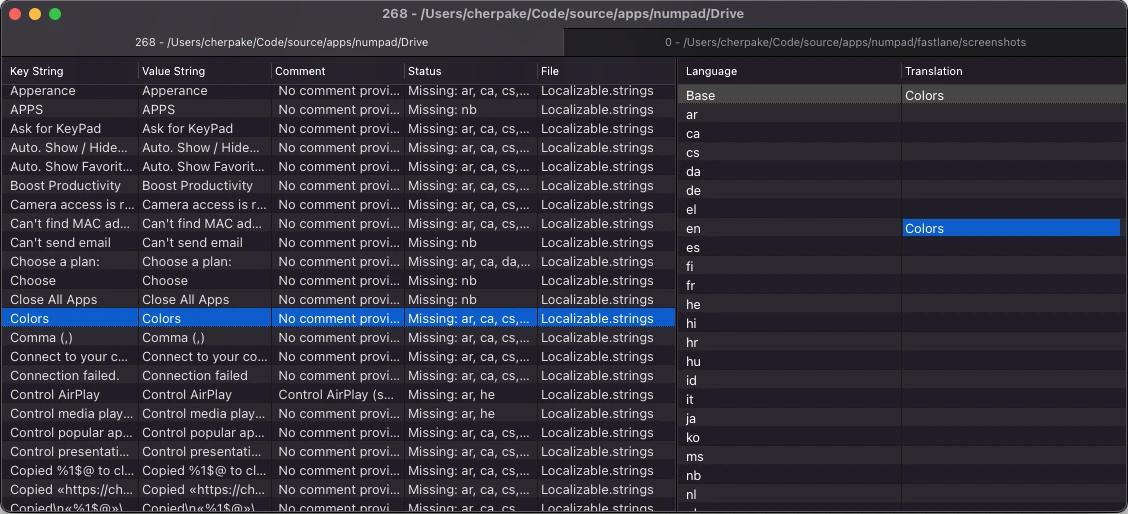
Open the project’s localization files, then hide fully translated entries. Review the remaining strings and their keys. The tabbed workspace helps you move between files while keeping the project together.
Reuse translations thoughtfully
Use matching translations from your other projects when they express the same meaning. A familiar English phrase may need a different translation in a different context, so review any reused text before accepting it.
This feature uses translations you already have. New copy without a match still needs to be translated.
Work with a translator
-
Open
Add your localization files.
-
Filter
Focus on incomplete strings.
-
Translate
Reuse a reviewed translation or export missing entries for translation.
-
Review
Import the results and check them in context.
Export only the strings that are missing translations, send those files through your usual translation workflow, and integrate the returned strings into the project. Check highlighted issues, including entries where the base-language wording appears unchanged in another language.
Review before shipping
Inspect the changed files in version control. Check placeholder tokens, punctuation, and multiline text, then run the app to review how the translated strings fit the interface.
For a file-compatibility question, contact support with the file type and a small example that contains no private project data.